How to Export Markdown From Google Docs
Direct Export: Google Docs to Markdown
Google Docs now offers a native download option that converts your document directly into clean Markdown syntax. This is the fastest, simplest way to transition your collaborative drafts into a portable format compatible with Markdown Mixer.
The Simple Workflow
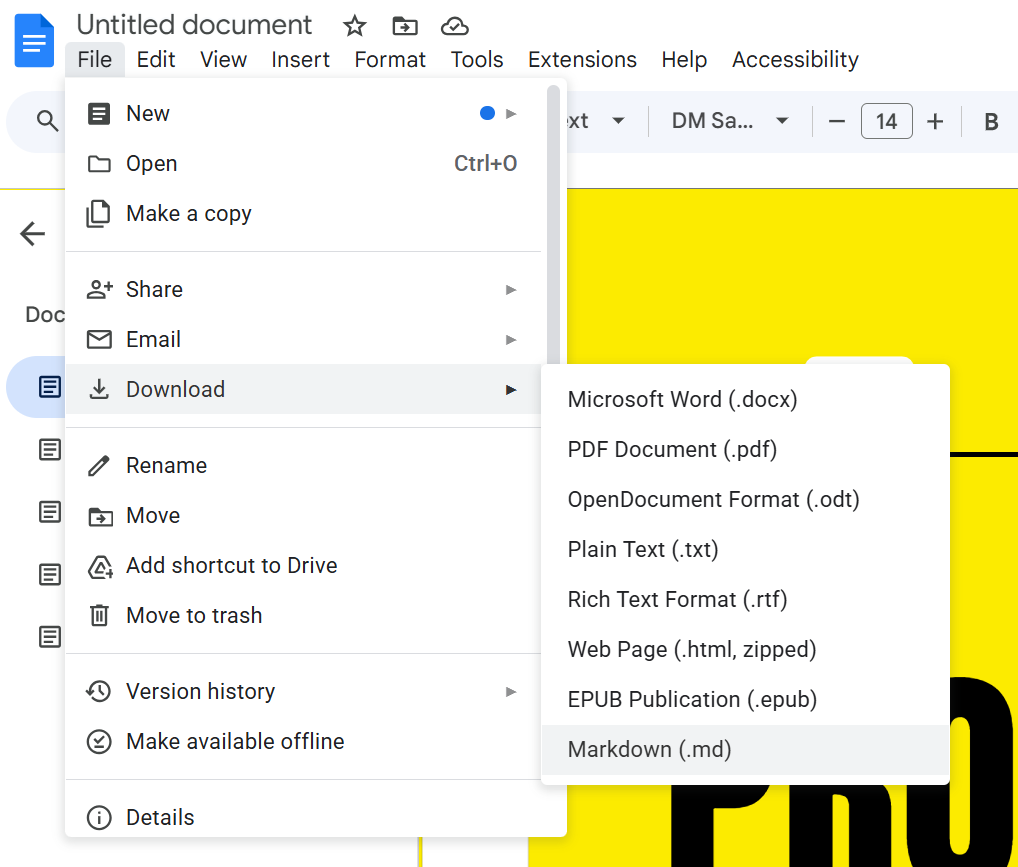
1. Export the Markdown File
This single action converts your entire document structure into a standard Markdown file (.md).
- In Google Docs, go to the top menu bar.
- Select File > Download.
- Choose Markdown (.md) from the list of available formats.
Your browser will immediately download the .md file to your computer.
2. Import into Markdown Mixer
Once you have your Markdown file, importing it into Markdown Mixer's editor is fast and easy:
- Navigate to the Markdown Mixer Editor.
- Locate and click the Import Button in the editor's navigation bar.
- Select the downloaded .md file from your computer.
The content will load instantly into the editor, ready for your final review and publishing.
Why Make the Switch?
While Google Docs excels at real-time collaboration, Markdown offers compelling advantages for publishing and version control:
- Universal Compatibility: Markdown is platform-agnostic. It works in your IDE, your CMS, and Markdown Mixer equally well.
- Clean Syntax: Exporting removes the proprietary "spaghetti code" often hidden behind rich text editors, ensuring semantic, readable content.
- Version Control: Unlike binary .docx files, Markdown text files can be effectively tracked, compared (diffed), and version-controlled in Git.
Next Steps
Your content is now in a clean, version-control-ready format. Save it to the Library and share your work effortlessly with your team.